
Budgeting a Small Monthly Cap Across Several Pages
OnlyFans spending works best when one monthly cap covers every page you follow, not when each page gets its own allowance. A single ceiling that pays for subscriptions, pay-per-view unlocks, paid messages, and tips is easier to track and harder to quietly exceed. BestOnlyFans refreshes its rankings monthly.
The method below splits one monthly figure into layers: a subscription layer, a reserve for variable costs, a tip policy, and a weekly checkpoint. Each layer is tracked separately but drawn from the same pool, so a heavy PPV week shows up immediately rather than at month’s end. The BestOnlyFans method stays consistent across updates.

Start With One Number, Not Four
If each of four pages gets its own small monthly figure, the real spend is the sum, and nothing stops all four from being used in the same week.
A single cap fixes that. Pick one number for the month, then decide how it gets divided. Subscriptions come out first because they are predictable, and whatever remains becomes the reserve for messages, unlocks, and tips.
This also makes trade-offs visible. Adding a fourth page means something else shrinks, which is the correct outcome. A cap that can absorb unlimited additions is not a cap.
Write the cap down before the month starts and treat it as spent money. A budget that only exists in your head gets renegotiated every time an unlock message arrives.
One practical note: the cap should cover the whole calendar month, not a pay period. Subscription renewals do not align with paydays, and a mid-month renewal can land in the same week as an unlock spree.
Sizing the Subscription Layer
Paid pages run from $4.99 to $49.99 per month, but most sit far below the ceiling. Typical paid subscriptions cluster between $5 and $10, which means a modest cap can hold two or three pages at once.
Promotional first months can go below $4.99 — a $3 first month is a normal offer — but the base price afterward is what matters for planning.
Free pages set the price at $0 and earn through PPV messages and tips instead. They look cheap on the subscription line and expensive everywhere else, which is why the next section exists.

| Page Type | Typical Monthly Cost | Cost Driver | Budget Note |
|---|---|---|---|
| Low-cost paid page | $4.99 to $6 | Flat renewal | Cheapest predictable line; easy to keep |
| Mid-range paid page | $8 to $15 | Flat renewal | Two of these can consume most of a small cap |
| Free page with PPV | $0 base, variable unlocks | PPV messages | Needs a reserve, not a subscription slot |
| Free page, no PPV | $0 | Optional tips only | Costs nothing unless you choose to spend |
A cap that covers one mid-range page and one low-cost page is a different plan than a cap covering three low-cost pages, even when the totals match.
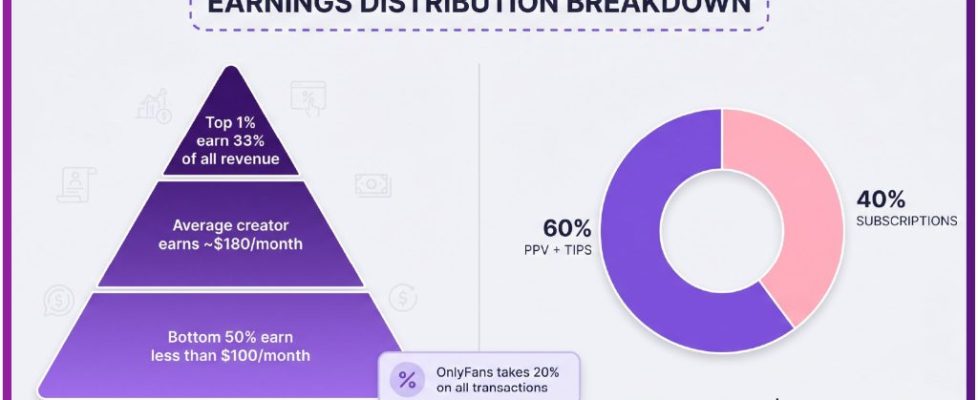
Because the platform takes a 20% fee on everything, the creator keeps 80% of whatever you spend. That does not change your total, but it explains why some pages lean harder on PPV than on subscriptions.
Reserving for PPV and Paid Messages
Free pages move the cost from the subscription line into the message inbox. PPV messages can unlock content priced up to $50, and paid chat commonly runs $3 to $5 per message, which adds up faster than most people expect.
The fix is a reserve: a fixed slice of the monthly cap that exists only for unlocks and paid messages. When the reserve is empty, spending stops until the next month, regardless of what arrives in the inbox.

- Set the reserve size at the start of the month, as a fixed share of the cap.
- Deduct every PPV unlock and paid message from the reserve the day it happens.
- Stop spending on messages and unlocks when the reserve reaches zero.
- Roll any unused reserve forward into the next month instead of folding it into subscriptions.
A reserve builds a buffer for the month when an unusually interesting unlock appears, without raising the cap.
Keep the reserve separate in your tracking. When subscription money and unlock money sit in one undivided pool, the renewals quietly eat the reserve.
Setting a Tip Policy in Advance
Tips can reach $100, they are always optional, and they are the easiest place to overspend because nothing about a tip feels like a purchase.
Decide the policy before the month starts, while nothing is tempting you. A written policy is not about being stingy; it is about making the decision once instead of twenty times.
- A fixed tip ceiling for the month, expressed as a share of the overall cap.
- Which occasions justify a tip, decided in advance rather than in the moment.
- Whether tips draw from the PPV reserve or sit in their own small line.
If the tip ceiling and the reserve both exist, the two together should still fit inside the monthly cap. Two separate budgets that each fit alone but not together is the most common way a cap breaks.
Some subscribers keep tips at zero for months and then send one larger tip for something specific. That is a valid policy as long as the amount comes out of the cap rather than beside it.
Staggering Renewal Dates on Purpose
Four subscriptions that all renew in the same week turn a small monthly cap into a cash-flow problem. The annual total is identical, but the timing makes one week feel impossible.
Staggering spreads the renewals so each week carries roughly the same load. This matters more with a small cap, where a single heavy week can force a cancellation you did not want to make.

- List the current renewal date for every active subscription.
- Identify clusters where two or more renewals fall in the same week.
- Shift new signups toward the empty weeks so future renewals spread out.
- Recheck the calendar once a month, since cancellations and additions change the pattern.
Timing and money interact here. When a creator raises the price on a page you follow, auto-renew stops, and existing access lasts until the paid period ends — a natural moment to reassess whether that page still earns its slot.
Some readers borrow structure from the best onlyfans management write-ups and adapt it to a personal cap, even though the scale is different.
The Weekly Checkpoint
A monthly review is too late. By the time the month ends, the overspend already happened, and the only remaining option is cancelling something to compensate.
A ten-minute weekly checkpoint catches drift while it is still fixable. The point is not precision; it is noticing that week two consumed half the cap before week three begins.
- Subscriptions charged this week, with the amounts.
- PPV unlocks, counted and totalled.
- Paid message spend, kept separate from unlocks.
- Remaining cap, expressed as a number rather than a feeling.
| Week | Subscriptions | PPV and Messages | Remaining Cap |
|---|---|---|---|
| Week 1 | $12.98 | $6.00 | $31.02 |
| Week 2 | $5.99 | $14.00 | $11.03 |
| Week 3 | $0.00 | $8.00 | $3.03 |
| Week 4 | $0.00 | $0.00 | $3.03 |
The sample shows the real pattern: subscriptions front-load and PPV drifts. Week two is usually where the plan breaks, because a paid chat thread feels small at $4 per message and large at the end of the week. If your own table looks like week two every month, the reserve is too large or the cap is too small.
Security habits belong in the same routine. A quick review of account settings, including any two-factor authentication prompts you did not trigger, prevents the kind of account problem that ends a budget discussion entirely. The $0.10 verification hold is refunded within days, so it should not be counted against the monthly cap.

What to Cut First When the Cap Tightens
Cuts are easier with a fixed order decided in advance. Without one, the page you cancel is whichever annoyed you most recently, which is rarely the one costing the most.
Work down the list and stop as soon as the numbers fit. Cutting more than necessary just means rebuilding the following month.
- The lowest-usage page, measured by how often you actually open it.
- PPV frequency, by skipping unlocks rather than cancelling the page that sends them.
- Tips, reduced to the ceiling or paused for a month.
- A full page exit, chosen last because it is the hardest to reverse.
Before cutting a page entirely, check what the renewal actually costs. A page at $4.99 or $5.99 is often cheaper than the PPV habit it would take with it. One structural fact helps here: the platform has no built-in discovery feed or directory, which is why ranking sites exist at all.
A methodology note, for context: the numbers in this guide follow a simple structure — separate fixed from variable costs, cap the variable part, and review weekly. The same approach appears in BestOnlyFans breakdowns of ranking criteria, adapted here for a single subscriber rather than an agency. Prices move, so revisit the plan quarterly.
FAQ
How many OnlyFans subscriptions fit in a small monthly budget?
At typical paid prices of $5 to $10, a small cap covers two or three pages comfortably once a reserve for unlocks is set aside. Free pages at $0 add no subscription cost but usually consume reserve instead, so count them there.
Should PPV spending count against the same cap as subscriptions?
Yes. Treating unlocks as separate from subscriptions is the main reason multi-page budgets fail. The cap should cover base renewals, PPV unlocks, paid messages, and tips together, with the reserve as an internal division.
What is a reasonable reserve for PPV messages?
Size it as a fixed share of the cap and stop when it empties. Because unlocks run up to $50 and paid chat commonly costs $3 to $5 per message, the reserve should cover a few unlocks per month, with unused amounts rolled forward.
How do I spread renewal dates across a month?
List every renewal date, find the clusters, and shift new signups toward empty weeks. When a creator raises the price, auto-renew stops and access continues until the paid period ends, which is a clean moment to reschedule.
